
Create Your First Pipeline
Last updated September 10, 2026
Describe who you're looking for, split deal-breakers from preferences, and get your first batch of researched leads.
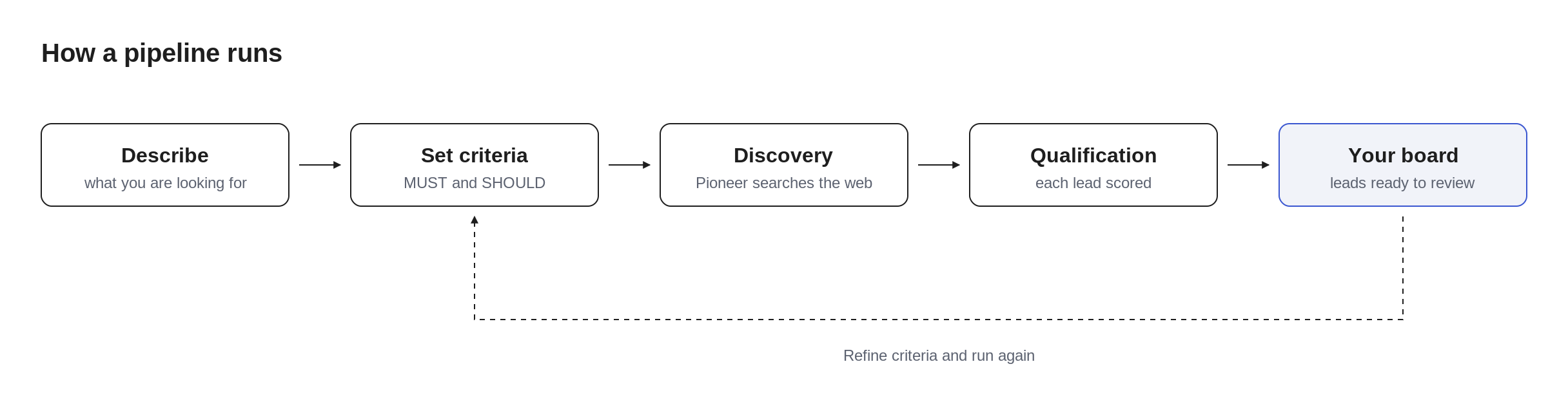
By the end of this page you'll have a running pipeline: Pioneer searching the web for leads that match your description, qualifying each one against your rules, and landing them on your board ready for review.
Want the extended version, one real pipeline followed all the way to an exported list, step by step? Read From signup to your first 50 qualified leads. This page is the fast path.
Let your agent do the setup with you
Pioneer is built to work with the AI agent you already use (Claude, ChatGPT, Codex, or any other). During signup you'll get a short setup message you can paste straight into your agent, and your agent will guide itself through connecting to Pioneer; it can even create this first pipeline for you. The same message is one click away later, via the ask your agent to do it prompt on the /pipelines page.
The message points at Use Pioneer With Your Agent, the full agent setup guide. Credentials are minted only when you ask, and shown exactly once.
Prefer to set everything up yourself? Everything on this page works by hand too; the agent path is a shortcut, not a requirement.
Your first pipeline might already exist
Some teams sign up and find a pipeline already sitting in their account, built by the Pioneer team, with real leads researched and qualified for their business. If that's you, here's what to know:
What it is. We sometimes build a pipeline for a company we think Pioneer can help, before anyone there has an account. When someone signs up with a work email from that company, the pipeline is automatically handed to their workspace.
It's yours now. Everything in it (the description, criteria, properties, and every researched lead) is fully editable, exactly as if you'd built it yourself. Nothing in it is demo data: the leads are real, researched against criteria we guessed for your business.
Our guess, your call. We wrote the description and criteria from public information about your company. Treat them as a first draft: skim the leads, then adjust the criteria in the Preferences column so they match how you actually qualify. Refining is the whole point. See Refine Your Pipeline.
Start by reviewing, not creating. The fastest way to get value is to open the pipeline, approve a few leads that look right, reject a few that don't, and steer from there. You can always create more pipelines alongside it. The rest of this page walks through building one from scratch.
Start from a recipe or from scratch
From the /pipelines page, you have two options:
From a recipe: Click Try this on any suggested recipe. Recipes are pipeline ideas Pioneer generates from your stated purpose, deliberately specific and narrow, because "Series A battery-recycling startups in the EU" makes a far better pipeline than "companies in energy". A recipe pre-fills everything; you can still customize before creating.
From scratch: Expand the "Create a custom pipeline" section and describe what you're looking for.
Either way, the two decisions that matter are the next two steps: the description and the criteria. Everything Pioneer finds flows from them.
Describe what you're looking for
Write a natural-language description of the leads you want to find:
Examples:
- "Early-stage fintech startups building payment infrastructure"
- "VP-level marketing executives at Series B+ B2B SaaS companies"
- "Climate tech investors who've made investments in the last 12 months"
- "Design agencies that specialize in enterprise software products"
Be specific. Pioneer follows your words, not the intent behind them. "Fintech startups" casts a wide net; "B2B fintech startups building payment infrastructure for marketplaces" aims the search. Each level of detail narrows where discovery spends its effort.
Split deal-breakers from preferences
Criteria are the rules Pioneer uses twice: to guide what it searches for, and to judge every lead it finds. They come in two tiers, and the split matters more than anything else on this page:
MUST criteria are deal-breakers. A lead that fails any MUST is not relevant, mechanically, no exceptions.
- "Must be a B2B company (not consumer)"
- "Must have raised funding"
SHOULD criteria are preferences. They improve a lead's ranking but never disqualify it.
- "Should have at least 50 employees"
- "Should have a US presence"
Why two tiers: if everything were a MUST, every preference would become a veto and almost nothing would qualify; if everything were a SHOULD, your actual deal-breakers would be negotiable. Put things you'd walk away over in MUST, and everything else in SHOULD.
Start with 3–5 criteria and expect to adjust after the first batch. Refining against real results is faster than trying to write perfect rules upfront. The full guide: Teach Pioneer What a Great Lead Looks Like.
Let Pioneer work
Once you create the pipeline, discovery begins:
- Pioneer searches the web. Not one query, but iterative exploration: multiple strategies, promising results followed deeper, the approach adjusted by what it finds.
- Each lead is qualified. Every discovered lead is evaluated against your criteria, with evidence and reasoning recorded per criterion.
- Leads land on your board. Qualified leads appear in the Leads column, best matches first, while in-flight research shows live in the Incoming box above it.
Discovery happens in the background, and you don't need to babysit it: when the run finishes, Pioneer emails you a summary with your leads attached as CSV files. Close the tab; the results will find you. See Export Your Leads.
Review your first batch
Click any lead to open its research:
- Summary: a concise overview of who or what this lead is. Read this first.
- Criteria results: how the lead scored against each of your criteria, with the evidence Pioneer found. How to read them: Read a Lead's Research.
Then make the call:
- Approve leads worth pursuing. They move to the Relevant stage, the first custom stage every pipeline is seeded with.
- Reject leads that aren't a fit. Rejected leads are recoverable, never deleted.
- Drag approved leads through your custom stages as you work them.
Don't agonize over borderline calls. Your approvals and rejections are feedback, and the next step turns that feedback into better results.
Refine and run again
Your first batch is a starting point, not a verdict. React to it:
Too few leads?
- Broaden your description
- Convert some MUST criteria to SHOULD
- Make criteria less restrictive
Too much noise?
- Make your description more specific
- Add MUST criteria for real deal-breakers
- Tighten existing criteria
The Preferences column on your board is where refinement lives. Pioneer suggests concrete improvements after each batch, and you can steer in plain language ("exclude agencies", "earlier stage only"). Two refinement passes usually close the gap between what you asked for and what you meant. The full playbook: Refine Your Pipeline.
Next steps
- From signup to your first 50 qualified leads: the same journey, end to end in full detail
- Your Pipeline & Board: what every column does and why
- Teach Pioneer What a Great Lead Looks Like: writing criteria that work
Need help?
If you have questions, reach out to us at support@pioneerclimate.com
From Signup to Your First 50 Qualified Leads
Follow one founder through the complete Pioneer journey, from signup through a first pipeline, teaching criteria, triaging the board, finding the decision-maker, and exporting.
Your Pipeline & Board
A pipeline is a research question Pioneer keeps answering. The board is where its answers meet your judgment.